


Law & Crime Plus
3.374.00 Reviews
App Specs
- Version
- Varies with Device
- Updated On
- License
- Free
- Downloads
- 50,000+
- Developer
- Law & Crime
- Categories
- News & Magazines
- Platform
- Android
Screenshots



 Analysis by AppCompare
Before I open a live trial stream, I like to know what kind of experience I’m signing up for: focused legal coverage, not a general news feed that happens to include a courtroom story now and then. That is the appeal of Law & Crime Plus for me. It is a free news and magazines app from Law & Crime, built around legal proceedings, crime stories, and commentary. If you are new to this subject, the easiest first step is to pick one case that genuinely interests you and follow it from the hearing itself to the analysis afterward.
What to expect from a legal-news app
I would approach Law & Crime Plus as a specialist viewing companion rather than a replacement for a broad news app. Its focus makes it useful when you want to spend time with a trial or understand the legal arguments around a case. It is less suited to someone who mainly wants a quick roundup of the day’s general headlines, weather, politics, and local updates; a conventional news app is a better fit for that wider routine.
The first-time experience is easier if you keep your goal modest. Instead of trying to browse everything at once, decide whether you want to watch events as they happen, revisit a proceeding, or hear analysis that helps explain what you have just seen. That simple choice gives your browsing a purpose and makes it less likely that a long catalogue of legal content will feel overwhelming.
Getting started without overthinking it
I would begin by opening the app and looking for a case or topic that already has your attention. The app’s search function can help when you have a specific name or subject in mind; if you do not, browsing for a case that sounds interesting is a gentler way in. You do not need legal training to follow a hearing, but it helps to treat the first viewing as an introduction rather than expecting every procedural detail to make sense immediately.
Because the app includes both live coverage and archived material, you have two practical ways to start. A live proceeding gives you the sense of watching a case unfold, while an archive is easier to fit around a busy day because you can choose a session that is already available. If you are unsure whether you can follow a trial in real time, starting with recorded material is the lower-pressure option.
Your first useful viewing
For a first meaningful session, I would choose one hearing or analysis video and watch with a narrow question in mind: what is the court deciding today, or what point is the commentator trying to clarify? That keeps the experience engaging without turning it into a test of legal knowledge. Afterward, look for another piece about the same case if you want more context, rather than jumping between unrelated stories before you have a sense of the first one.
This workflow also helps separate the event from the explanation. A courtroom stream shows what happens in court; commentary can help you think through why a particular exchange matters. I find that pairing the two is more useful than watching a dramatic moment in isolation, especially when a case is still unfolding and early impressions may change as proceedings continue.
Worth Reading Before You Choose

EA SPORTS FC Mobile 26 Is a Bigger Football Game, but It Takes Time

Flipboard Shows What News Apps Must Do Beyond the Feed

Switching to Android Auto Means Rethinking Your Driving Routine

Google Calendar Makes a Crowded Week Easier to Manage

Ludo King Makes the Most of the Minutes Between Plans

Baby Panda World Brings Quick Play to Modern Phones, but Its Game Library Feels Busy
Unraveling the Features
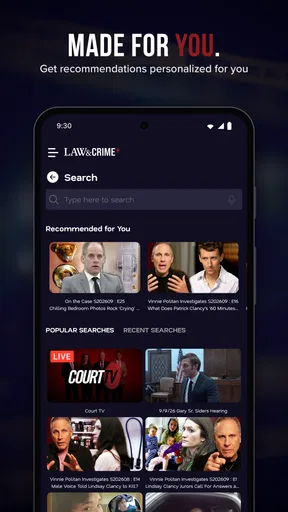
Alright, so let’s talk about what makes Law & Crime Plus tick. Right off the bat, the interface is super sleek and easy to navigate. Whether you’re a tech wizard or someone who struggles to find the power button (no judgment here), getting around this app is a breeze. Everything is laid out in a way that makes sense, and it’s definitely designed with the user in mind.
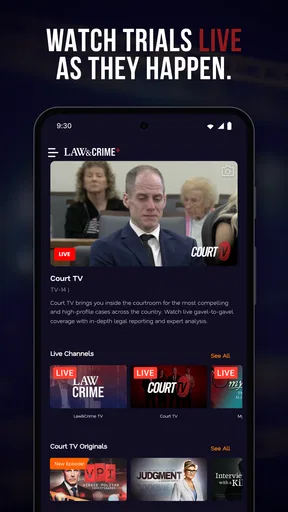
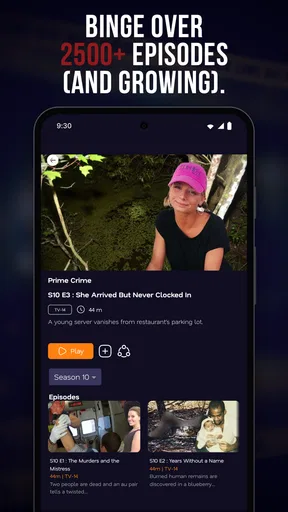
One of the standout features is the live trial coverage. Yep, you heard me right. You can catch real-time courtroom drama as it unfolds. It’s like being a fly on the wall in some of the most intense legal battles you can imagine. And if that’s not enough to whet your appetite, there’s a treasure trove of archived trials and legal analysis videos to binge on. So, whether you’re studying for law school or just a crime junkie, there’s plenty to keep you entertained.
Content Galore
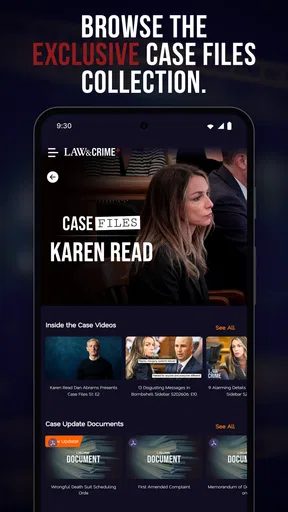
What I love about this app is the sheer amount of content it offers. There’s a mix of everything from high-profile cases to those lesser-known gems that are equally intriguing. The app doesn’t just throw content at you, though. It’s thoughtfully curated, so you’re always getting quality over quantity. The experts and commentators featured bring a lot to the table, offering insights that are both educational and engaging.
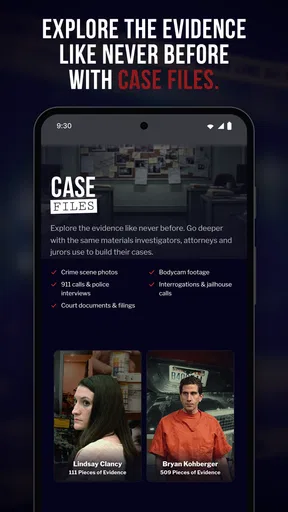
If you’re someone who likes to get into the nitty-gritty details, you’ll appreciate the detailed case files and analysis. It’s not just about watching; it’s about understanding the intricacies of each case. Honestly, it’s like having a personal tutor guiding you through each twist and turn.
Following a case thoughtfully
One small habit makes legal coverage easier to use: keep track of what you have actually watched, rather than relying on memory after dipping in and out of a long case. I would note the hearing or issue that caught my attention, then return to the relevant archived coverage or analysis when I have time. This is especially useful if work, school, or family commitments mean I cannot watch a proceeding from beginning to end.
It is also worth being patient with the difference between a courtroom moment and a final outcome. A sharp exchange can be compelling, but it does not necessarily settle the larger question in a case. I treat live coverage as a window into proceedings, not as a complete account of every fact or a substitute for a final legal decision. That approach helps keep the viewing interesting without mistaking drama for a verdict.
When this app fits—and when it does not
I can see this being a good choice for someone who follows trials as a regular interest, a student who wants to observe courtroom procedure, or a viewer who prefers legal explanation alongside crime coverage. It can also suit a casual viewer who has one particular case in mind and wants to explore more than short clips or headlines. The most rewarding use is focused: follow a case, then use the analysis to make sense of the proceedings.
I would skip it if I wanted a broad, fast-moving news service or if I rarely watch video. Legal proceedings can take time, and the value often comes from context rather than a quick burst of entertainment. Someone looking for scripted courtroom drama should also choose a film or television service instead; real hearings are less tightly paced, and their most important developments may be subtle rather than sensational.
Against the usual alternatives in the news category, the trade-off is clear. General news apps are more convenient for scanning a wide range of topics, while short social clips are quicker but can strip a courtroom moment of context. This app’s specific strength is giving legal coverage room to breathe, with live proceedings and analysis available in the same subject area. I would use it alongside a broad news source, not expect it to do that source’s job.
Ease of Use
I’ve got to give props to the developers for how user-friendly Law & Crime Plus is. The search function is a lifesaver, especially when you’re trying to find specific cases or types of legal content. Plus, the app’s streaming quality is top-notch. No annoying buffering or lags, just smooth sailing all the way.
Another cool aspect is the customization options. You can set up notifications for upcoming trials or new content drops, so you’ll never miss a beat. It’s like having a personal assistant keeping you in the loop with all things law and crime.
Making notifications work for you
I would use notifications selectively rather than turning on every alert. A reminder about a trial I genuinely intend to follow can help me return at the right time; alerts for every new item could turn a focused interest into a stream of interruptions. If I am only exploring a case casually, I would leave the routine less demanding and use search or browsing when I have time.
Search is most helpful when I already know what I am trying to find. For a first visit, a name or case topic gives it a clear job; for open-ended discovery, browsing is less fussy. One practical trade-off is that a live hearing follows the court’s schedule, while archived viewing fits your own. I would choose based on whether being present as events happen matters to me, not assume that every session will suit a spare few minutes.
Common questions before settling in
Is it free to try? The app is free to download, though it also offers in-app purchases ranging from $0.99 to $40.99 per item. I would check what an optional purchase covers before committing, and start with the free experience to see whether the app’s legal focus suits my habits. Its content rating is Everyone, but individual crime and trial coverage can still involve serious subject matter, so parents may want to consider a child’s maturity rather than relying on the age label alone.
Does it make sense if I am not a lawyer? Yes, if I am willing to watch with curiosity and accept that some legal language may take a little time to understand. The analysis can make proceedings more approachable, but I would not treat an app video as personal legal advice. If I need guidance about my own situation, I would speak with a qualified professional rather than draw conclusions from coverage of someone else’s case.
How do I avoid getting lost in a long-running story? I would choose one case, search for related coverage when I return, and use analysis to clarify the questions raised by a hearing. If I have only a short break, an archived item is a more predictable choice than starting a live proceeding. That is a useful distinction for commuters or anyone who cannot keep a stream open for an extended stretch.
Who is behind it, and what to expect over time
Law & Crime developed the app, which sits in the news and magazines category. It has a 3.3 average from around 200 ratings, so I would treat the score as a reason to try it with realistic expectations rather than proof that it will suit everyone. The audience is specialized: someone who follows legal stories may value the focus more than a user who expects the breadth and quick scanning of a general news service.
The app has passed 50,000 installs and is rated for Everyone. Those details give a basic sense of its audience and availability, but the more useful test is personal: can I find a case I want to follow, and does the combination of coverage and explanation keep me interested? I would answer that after trying a small, specific viewing routine rather than judging it by how much content I can browse in one sitting.
“Law & Crime Plus offers a gripping and immersive experience for anyone fascinated by the legal world.”
Conclusion
All in all, Law & Crime Plus is a must-have for anyone with a penchant for legal dramas and true crime. Whether you’re a budding lawyer, a crime aficionado, or just someone looking for something new to dive into, this app delivers on all fronts. It’s engaging, informative, and surprisingly addictive.
So, if you’re ready to enter the world of courtroom showdowns and unravel the mysteries of crime, give this app a shot. It’s one of those rare finds that manages to educate and entertain in equal measure. Happy watching!
My practical recommendation
My advice to a first-time user is simple: pick a case, try one live or archived viewing, and follow it with analysis if you want to understand the legal context. Keep alerts focused on proceedings you truly plan to watch, and use a broad news app for everything outside law and crime. That approach gives this specialist app a fair test without asking it to replace tools built for a different purpose.
For a legal-news fan, that focused routine is the clearest reason to keep it installed. For someone who wants quick headlines, little video, or a complete general-news picture, it may be more sensible to look elsewhere. I would give it a try if courtroom coverage is already part of your interests, while keeping expectations grounded: real cases unfold at their own pace, and the app is most rewarding when you have time to follow the details.
Pros
- Extensive library of legal content.
- User-friendly interface for easy navigation.
- Regularly updated with new episodes.
- Available on both Android and iOS.
- High-quality video streaming capabilities.
Cons
- Requires a subscription for full access.
- Limited offline viewing options.
- No option for personalized playlists.
- Some content may be region-locked.
- Occasional buffering issues on older devices.
FAQs for Law & Crime Plus
What content is available on Law & Crime Plus?
Law & Crime Plus offers a wide range of content, including live trial coverage, legal analysis, and crime documentaries. Subscribers can access exclusive interviews with legal experts and in-depth discussions on high-profile cases. The app ensures that users stay informed about the latest developments in the legal and crime world.
Is Law & Crime Plus available on both Android and iOS devices?
Yes, Law & Crime Plus is available for download on both Android and iOS platforms. Users can enjoy seamless streaming across smartphones and tablets, ensuring access to their favorite legal and crime content wherever they are. Ensure your device meets the minimum system requirements for optimal performance.
Does Law & Crime Plus offer a free trial period?
Law & Crime Plus typically offers a free trial period for new subscribers. This allows potential users to explore the app’s features and content before committing to a subscription. Check the app's official website or the store listing for current promotions and trial offers.
What are the subscription options for Law & Crime Plus?
Law & Crime Plus provides various subscription plans to suit different needs. Users can choose from monthly or annual plans, with the annual plan often offering a discounted rate. Subscribers gain unlimited access to all content, ensuring they stay up-to-date with the latest legal and crime stories.
How user-friendly is the Law & Crime Plus interface?
The Law & Crime Plus app is designed with user experience in mind, featuring an intuitive and straightforward interface. Users can easily navigate through categories, search for specific content, and personalize their viewing experience. The app also supports high-quality streaming, enhancing overall user satisfaction.


